
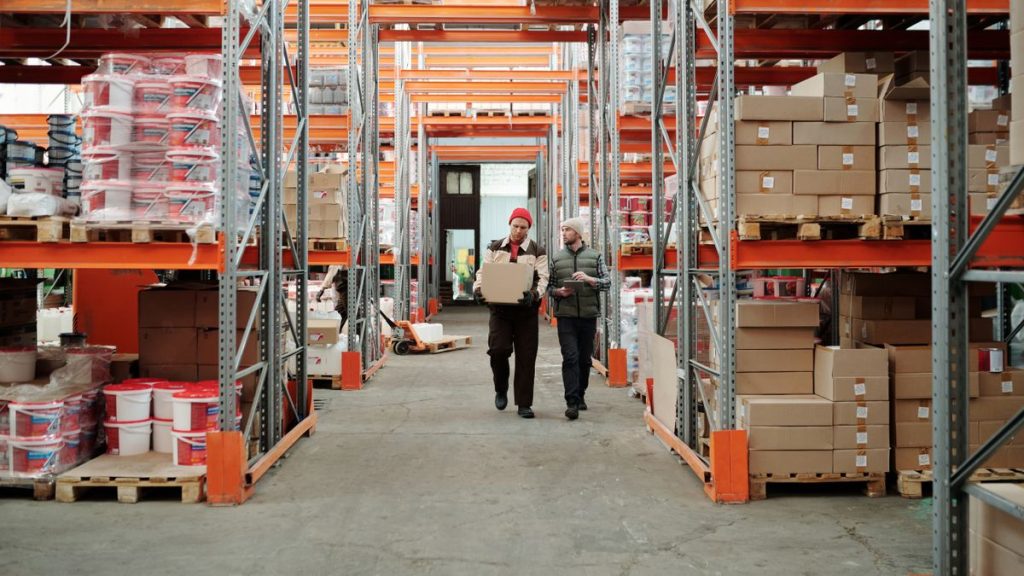
A warehouse management system is the software that knows where everything in a building is, what is promised to whom, and what each person should do next. Everything else in a modern warehouse either feeds it or takes instructions from it.
The honest case for one is narrower than the sales material suggests. A WMS does not make a badly run operation efficient. What it does is remove the guesswork from work that is currently held in people’s heads, on paper, or in a spreadsheet that one person maintains.
Below is what actually changes when you put one in, what it does not fix, and how to tell whether you are ready.
What Changes First
You Stop Guessing Where Stock Is
Before a WMS, location knowledge lives with the people who have worked there longest. That works until somebody is on holiday, until a pallet is put down in the wrong aisle, or until the business grows past what one person can hold in their head.
A WMS records the location at the moment of putaway and updates it at every move. The gain is not speed in a single pick. It is that a new starter can find something as quickly as a ten year veteran.
Picking Errors Become Visible
In a paper operation a mispick is discovered by the customer. With scanning in place, the system asks for a confirmation at the shelf and refuses the wrong item before it leaves the building.
The honest framing: errors do not stop happening. They get caught earlier, which is cheaper, and they get attributed, which makes the pattern fixable.
Walking Reduces
Travel is the largest labour cost in most warehouses. A WMS reduces it two ways. Slotting puts fast moving items near despatch, and pick path sequencing orders a route so nobody crosses the same aisle twice.
This is the saving that most reliably pays for the system, and it is also the one that depends entirely on the data being right. A pick path built on wrong dimensions produces a route that does not work.
Stock Counting Changes Shape
Full stocktakes that close the building for a weekend give way to cycle counting, where a small number of locations are checked continuously during normal work. Discrepancies surface within days rather than at year end.
What It Does Beyond the Four Walls
- Order promising. Sales can see what is genuinely available rather than what the ledger says, which is the difference between a promise you can keep and one you cannot.
- Returns. A WMS handles the reverse journey: inspection, grading, restock or scrap, which is where a great deal of value leaks in retail operations.
- Traceability. Batch and serial tracking means you can answer which customers received stock from an affected batch. For food, pharmaceutical and parts businesses this is a legal requirement rather than a nice feature.
- Labour visibility. You can see how long tasks actually take, which is useful for planning and uncomfortable to look at for the first month.
- Integration. The system talks to the finance package, the sales channels and the carriers, so the same number appears everywhere instead of being rekeyed.
WMS, ERP and Inventory Software Are Not the Same
These get used interchangeably and they do different jobs.
- Inventory management software tracks how much of something you have. It usually does not care where it is.
- A WMS tracks where each unit is, who is doing what, and in what order, inside a specific building.
- An ERP runs the business: finance, purchasing, orders. Most have a warehouse module, and for a simple operation it is enough.
The practical test: if your problem is knowing how many you have, inventory software may solve it. If your problem is that people cannot find things, that picks go wrong, or that you cannot sequence work, that is a WMS problem and an ERP module will usually disappoint.
What a WMS Will Not Fix
Worth being blunt about, because these are the reasons implementations disappoint.
- Bad master data. If weights, dimensions and barcodes in the system do not match the real goods, every plan built on them fails. This is the single most common cause of a poor go live.
- A layout that does not work. Software can sequence a route around a badly arranged building; it cannot make the building sensible.
- Not enough people. A WMS redistributes work and makes it measurable. It does not do the work.
- Suppliers who deliver late or short. The system will document the problem precisely and change nothing about it.
- Processes nobody follows. If the current rule is routinely ignored, enforcing it in software produces workarounds rather than compliance.
How to Tell If You Are Ready
Signals that an operation has outgrown spreadsheets and paper:
- Stock is regularly found in the wrong place, or not found at all.
- Customers report wrong items often enough that somebody keeps a list.
- Training a new picker takes weeks because the knowledge is not written down.
- You cannot answer what is available to promise without walking to look.
- Stocktakes produce large adjustments that nobody can explain.
- Peak season requires temporary staff who cannot be productive quickly.
- You handle batches or serial numbers and recall traceability is manual.
Two or three of those is a reason to look. One on its own is usually a process problem that software will make more expensive rather than solve.
The Parts of a WMS You Will Actually Use
Vendor feature lists run to hundreds of items. In practice most operations live in five areas.
Receiving and Putaway
Goods are checked against what was ordered, discrepancies are recorded at the door rather than discovered later, and the system directs where each pallet goes. Directed putaway is where most of the later picking efficiency is created, because a system that chooses locations deliberately produces a warehouse that can be picked efficiently.
Picking
The system decides how orders are grouped and in what order items are collected. Single order picking suits large orders, batch picking suits many small ones, and zone picking suits a long building with specialised areas. Most warehouses use more than one method depending on the order profile.
Packing and Despatch
Verification at the pack bench, carton selection, label generation and carrier handover. The value here is the last check before the parcel becomes somebody else’s problem.
Replenishment
Moving stock from bulk storage to pick faces before the face runs empty. Done well it is invisible. Done badly it is the reason pickers stand waiting.
Reporting
Not dashboards for their own sake. The useful ones answer three questions: what is late, what is short, and where did the time go.
What It Costs Beyond the Licence
The software price is rarely the largest number, and the others are easy to leave out of a business case.
- Hardware. Scanners, label printers, mounts, and wireless coverage that works at the back of a racking aisle. Poor wireless coverage defeats otherwise good implementations.
- Data preparation. Measuring and weighing products, fixing barcodes, agreeing naming. Unglamorous, unavoidable, and usually underestimated.
- Integration. Connecting to the finance system, the sales channels and the carriers.
- Training and lost productivity. Output drops during the transition. Planning for that is better than being surprised by it.
- Ongoing support, and somebody internally who owns the system rather than treating it as IT’s problem.
Going Live Without Breaking the Operation
- Fix the data first. Weights, dimensions, barcodes, locations. Nothing else matters as much.
- Agree the processes before configuring. Software should reflect how you decided to work, not decide it for you.
- Count everything immediately before go live. Starting from a known position is worth the disruption.
- Pick a quiet period. Going live in peak season is a decision people regret.
- Run a pilot area rather than the whole building, so mistakes are contained.
- Keep a manual fallback for the first weeks and make sure people know it.
- Expect output to dip for a short period, and staff accordingly rather than demanding the old numbers on day two.
The operations that go live smoothly are almost always the ones that spent longer on data and process than on choosing between products.
Choosing Between Products
Most shortlists are built from search results and demos, which rewards marketing rather than fit. A better order:
- Write your own requirements first, from the problems you listed, before seeing any product. A requirements list written after three demos is a list of features you were shown.
- Separate must from nice. Most systems do the common things adequately. The decision is usually made by two or three specifics: a particular carrier integration, a traceability rule, a way of handling kits or serial numbers.
- Ask about your order profile, not in general. A system built for pallet movements behaves differently from one built for single item ecommerce picking.
- Ask what happens when the internet goes down, and get the answer in writing.
- Talk to a reference customer of similar size, and ask specifically what went wrong at go live rather than whether they are happy.
- Price the whole thing, including hardware, integration, data work and the first year of support.
Where This Is Going
Two shifts worth watching, both of which change what a WMS has to do rather than replacing it.
Robotics is becoming normal at smaller scale. Goods to person systems used to belong to very large operations and are now reaching mid sized ones. The consequence for the software is that the WMS stops directing a person to a location and starts coordinating with another system that brings the location to the person.
Demand for traceability keeps rising. Food, pharmaceutical and parts supply chains face steadily tighter requirements to show where something came from and where it went. That is a data discipline question before it is a software one, and operations that never got their batch recording right will feel it first.
Neither changes the basic advice. The system is only as good as the data in it, and the data is a people and process problem rather than a technology one.
Frequently Asked Questions
What are the benefits of a warehouse management system?
Accurate stock locations that anyone can use, picking errors caught before despatch rather than by the customer, less walking through slotting and pick path sequencing, continuous cycle counting instead of full stocktakes, and batch traceability where it is required.
What is the difference between a WMS and inventory software?
Inventory software tracks how much you have. A WMS tracks where each unit is, who is doing what and in what order inside a building. If your problem is people not finding things, that is a WMS problem.
Do I need a WMS if I already have an ERP?
Not necessarily. Most ERPs include a warehouse module and for a simple operation it is enough. A dedicated WMS earns its place when sequencing work, directed putaway and pick optimisation start to matter.
What is the biggest reason implementations fail?
Bad master data. If weights, dimensions and barcodes do not match the physical goods, every plan the system builds on them is wrong, and the problem usually appears at go live rather than before.
Will a WMS reduce headcount?
It redistributes work and makes it measurable rather than removing people. The saving most operations actually realise is in reduced travel and fewer errors, not in roles.
How long does implementation take?
It depends far more on data readiness and process definition than on the software. Cleaning up master data and agreeing how work should run is normally the longest part, and it has to happen whichever product you choose.
What is cycle counting?
Counting a small number of locations continuously during normal operation rather than closing for a full stocktake. Discrepancies surface within days, which makes the cause findable.
Does a WMS work with robots?
It has to. In goods to person setups the WMS decides what is needed and the robotics system moves it, so the two must be integrated. Buying automation before the WMS is in order generally goes badly.
Is cloud or on premise better?
Cloud removes the server and the upgrade burden, which suits most operations. On premise is still chosen where connectivity is unreliable or where the warehouse must keep running independently of the internet.
Can a small warehouse justify one?
Sometimes. The question is not size but complexity: number of SKUs, order profile, how much picking there is, and whether traceability is required. A small operation with thousands of SKUs has a stronger case than a large one with fifty.
The useful way to approach this is from the problem rather than the product. Write down the three things that go wrong most often in your warehouse. If they are location, accuracy and sequencing, a WMS addresses them. If they are supply, layout or staffing, it will not.
More from us: how technology streamlines the distribution of goods and Zigbee against Z-Wave for connected devices.
Pingback: RFID vs Barcode: How to Choose for Your Warehouse